After signing up for a new VPS service on Hostinger I went about trying to “harden” the server. This involved the minimal steps of setting up SSH keys on my local machines and uploading the public keys to the server so I could SSH into it. I then removed the ability to SSH via password. While this did what was intended, keeping anyone other than me from SSH’ing into it, it didn’t stop the nearly constant attempts by bots to log into the machine. So with that in mind, I decided to add some more defensive layers. Here’s what I did.
Posts for: #Tailscale
Using Tailscale Services
Up until a few days ago, I used the
Docker sidecar method
to expose services with easy to remember addresses. For instance, using it with
Immich
so I could just enter something like https://immich.gallant-panda.ts.net in the browser to get to it. This works well but always seemed a bit clunky since it requires an additional docker container to work.
With the beta release of Tailscale services there is, in my opinion, a better, cleaner way to do this. Services allow you to essentially expose a specific service (not the whole machine) as a node on your Tailnet. You can even assign tags to it in order to apply access control via the normal Tailscale ACL’s and grants. The service can also act as a sort of load balancer since you can host the service on multiple machines and Tailscale will connect the user to the closest one automatically.
Tailscale Service from a Linux Client
If you cannot access a Tailscale service from a Linux machine, you likely need to run this command:
sudo tailscale set --accept-routes
Here’s why:
Unlike a standard device (a “node”), a Tailscale Service is a virtual entity. It doesn’t represent a single physical network interface.
- Standard Node: Your Mac or Linux box has a direct “Peer” entry in the internal WireGuard table. Linux sees these
100.x.y.zaddresses and knows they belong to thetailscale0interface by default. - Service IP: A Service IP is essentially a Shared Anycast IP. It is “advertised” by one or more nodes in your network. Because it is being advertised rather than being a direct peer-to-peer connection, Linux treats the traffic to that IP as a route rather than a simple local interface destination.
Linux is often used as a router or server. To prevent Tailscale from accidentally hijacking existing routes or creating “routing loops”, Tailscale on Linux ignores all advertised routes until you explicitly opt-in.
Using AdGuard For Efficient DNS Lookups
If you went through the previous post and got Caddy working to obtain TLS/SSL certificates on your home network you may have noticed that the process introduced some inefficiencies in the DNS lookup process. Namely, we’re now going out to a public internet DNS provider, like Cloudflare, as part of the DNS lookup process for a machine on our internal network.
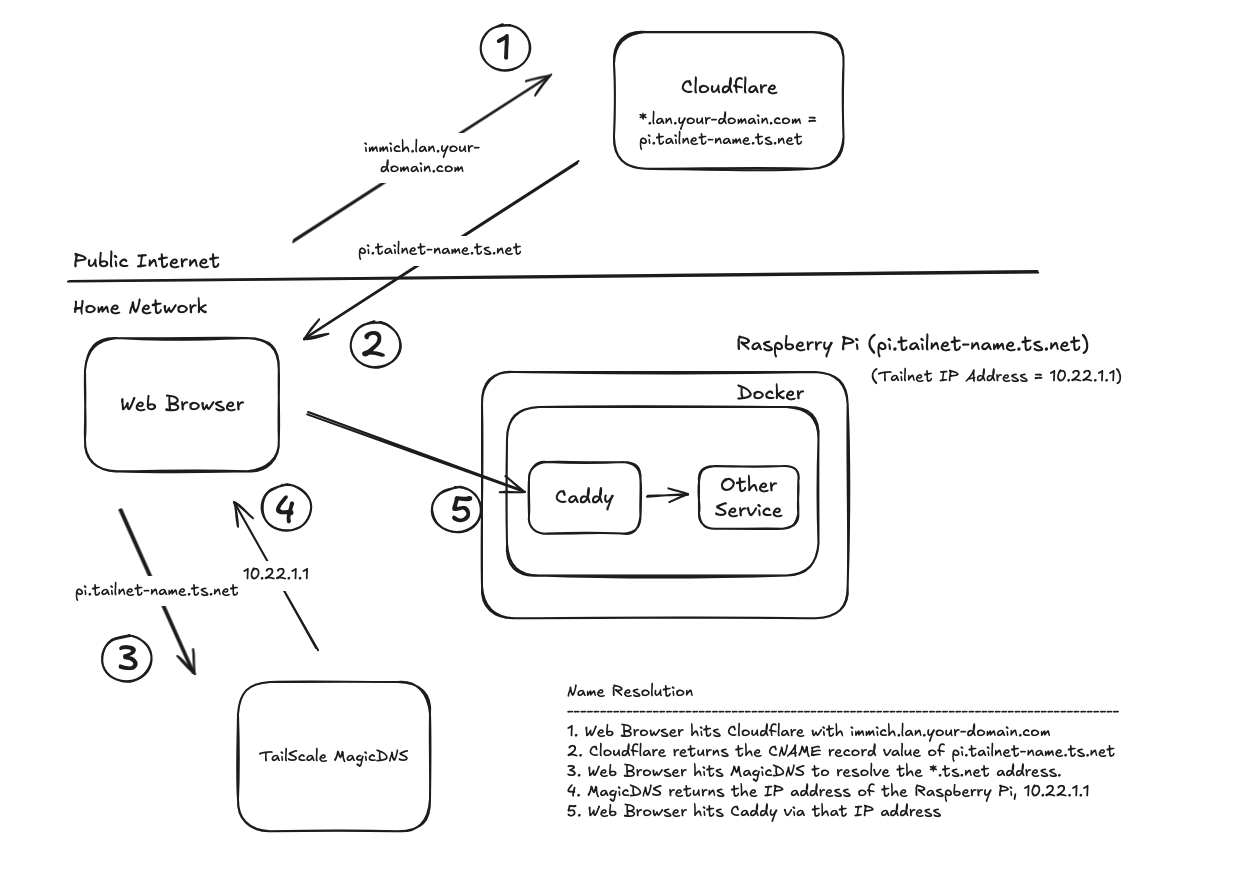
The extra time is a few dozen milliseconds, but if you want to optimize speed, you can add either AdGuard or Pi-Hole to the mix. Both products act as a middleman between your devices and the DNS providers on the public internet. Their primary purpose is to block ads by not forwarding the DNS request if the domain name of the requested address matches a know ad or malware site. However, both products also allow for DNS rewrites (DNS Records if you’re using Pi-hole), which are static mappings of domain names to IP addresses. Basically, it can resolve specific domain names to IP addresses without hitting an upstream Internet DNS service. By utilizing that feature, we’ll end up with this.
Using Caddy with Tailscale and Docker
Here’s the setup.
- You have one or more services running in Docker containers.
- The devices that need to access those services are part of a Tailscale network (Tailnet).
- You own a public domain name (e.g., your-domain.com)
- You want/need to serve those services via HTTPS
- You don’t want to open any ports or other holes in your firewall.
- You don’t want to mess with self-signed certificates or create your own private certificate authority.
If this is your situation, this post might help.